


Mico - Widget & Live Wallpaper
4.1832.00 Reviews
App Specs
- Version
- 1.64.0
- Updated On
- License
- Free
- Downloads
- 10,000,000+
- Developer
- MICO LTD
- Categories
- Personalization
- Platform
- Android, iOS
Screenshots
 Analysis by AppCompare
I tend to notice the home screen most when I’m reaching for my phone on autopilot: if it looks cluttered or dull, I feel it every time I unlock the device. That’s what made me curious about Mico - Widget & Live Wallpaper, a free personalization app from MICO LTD for bringing widgets and backgrounds together. Its appeal is easy to understand, but I’m more interested in whether the visual choices remain comfortable and usable once the novelty wears off.
Readability and navigation: easy to explore, worth choosing carefully
The moment I launched Mico - Widget & Live Wallpaper, I was greeted with a vibrant interface that screamed creativity. The app doesn’t waste your time with complicated menus; instead, it gets straight to the point, which is something I appreciate. The design is intuitive, making it easy for anyone to navigate, even if you’re new to customizing your phone.
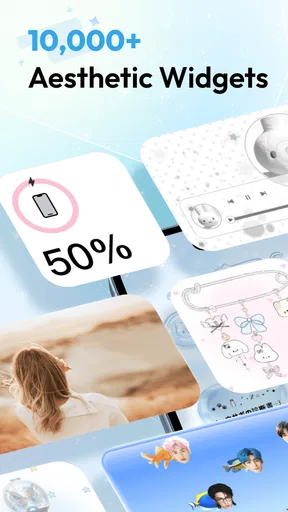
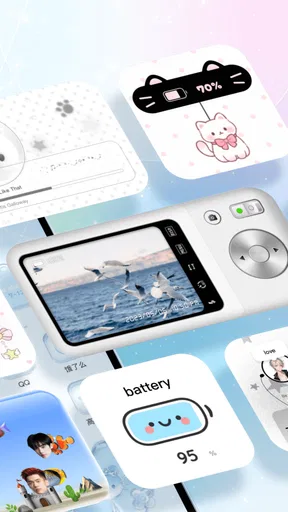
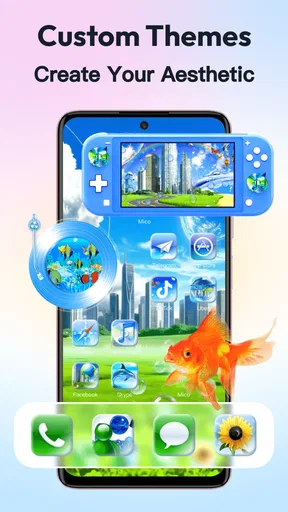
As soon as I started exploring, I was blown away by the variety of widgets and live wallpapers available. You can choose from a wide array of themes, from minimalist designs to more elaborate, animated backgrounds. It genuinely feels like there's something for everyone here.
That range is useful, but it also means the best-looking option is not automatically the best everyday option. A detailed widget can look striking in a preview and still be hard to scan when you’re checking the time or a small piece of information quickly. I’d compare several designs at the size they will occupy on your home screen, rather than judging only by a large preview. A simple layout with clear contrast often works better for routine glances than a busy theme that competes with icons.
Motor and sensory considerations: make the screen work for you
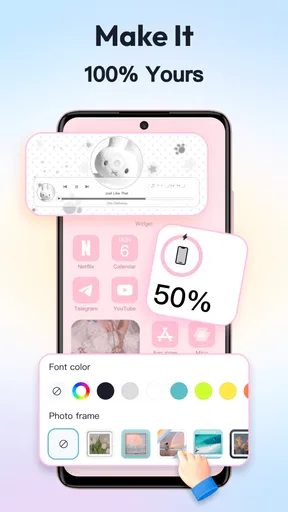
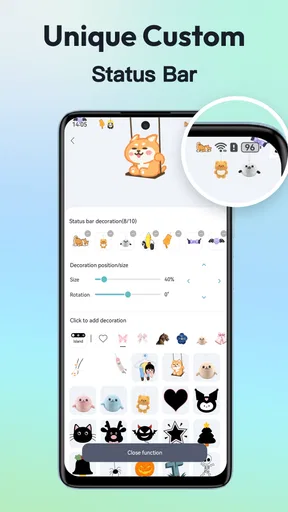
The real magic of Mico happens in its customization settings. You can tweak almost everything to your liking. Want to change the color of your widgets? Done. Prefer a moving background to keep things lively? Easy. And the best part is that you can preview changes in real-time, which is super handy for indecisive folks like me.
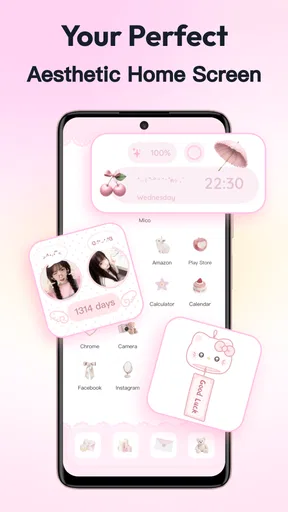
One feature that really stood out to me was the ability to combine widgets and wallpapers. This means you can have a cohesive theme running throughout your home screen, creating a seamless look that’s both stylish and functional. It’s like having your very own digital canvas.
For a more comfortable setup, I’d treat the wallpaper and widgets as separate decisions before tying them into one theme. First pick a background that doesn’t make text and icons difficult to distinguish; then add a widget whose colors and visual weight remain easy to read over it. If motion is distracting, a still background is the sensible choice, even if an animated one looks more eye-catching. The practical trade-off is clear: a coordinated screen can feel personal, but readability should win over perfect color matching.
Worth Reading Before You Choose

Flipboard Shows What News Apps Must Do Beyond the Feed

Switching to Android Auto Means Rethinking Your Driving Routine

Google Calendar Makes a Crowded Week Easier to Manage

Ludo King Makes the Most of the Minutes Between Plans

Baby Panda World Brings Quick Play to Modern Phones, but Its Game Library Feels Busy

ESPN’s Live Game View Makes Following Close Games Easier
I also wouldn’t assume that a particular design will suit every situation. A bright screen can be pleasant in a well-lit room yet feel harsh when checking a phone in bed. If you use your device in varied lighting, try your chosen look at the times and places you normally unlock it. A quick preview is helpful, but seeing the finished home screen with your own icons and habits is a better test.
Situational access: useful when a quick glance matters
I’ve used other customization apps before, and sometimes they tend to slow down your phone. Thankfully, Mico doesn’t fall into that trap. The app runs smoothly, and the live wallpapers are surprisingly light on resources, so you don’t have to worry about draining your battery too quickly.
Another thing I loved is how simple it is to switch things up. You can change your setup as often as you like without any hassle. I found myself experimenting with different looks throughout the day, just because I could. It’s kind of addictive, to be honest.
One realistic use is setting up a calm, legible home screen before a busy day: choose a restrained background and a widget arrangement that lets you find what you need without searching through several pages. On a commute or while carrying bags, fewer visual distractions can make quick checks more comfortable. I’d save more decorative experimentation for home, where there’s time to preview and adjust rather than trying to redesign the screen between tasks.
It’s also worth thinking about who is holding the phone. If you share your device with a family member who prefers larger, clearer visual elements, a highly detailed theme may not be the considerate choice. Mico can help you personalize the appearance, but the useful test is whether the person who actually uses the screen can comfortably distinguish its elements. For anyone with low vision or sensitivity to movement, the strongest choice may be a simple static look rather than the most elaborate option.
Compared with using a single wallpaper app or relying only on the phone’s built-in home-screen tools, Mico’s distinctive draw is bringing visual themes, widgets, and wallpapers into the same customization experience. That can save effort when you want a coordinated look. The trade-off is that users who only need one plain background may find a dedicated wallpaper picker or the device’s own settings more direct. If precise control over every part of a home screen matters more than ready-made visual styling, the built-in launcher options may also be a better fit.
Community inspiration and the limits to keep in mind
One of the coolest aspects of Mico is its community-driven content. Users can share their designs, and you can download themes created by others. It’s a fantastic way to get inspired and see how others are personalizing their devices. Plus, you can even submit your own creations if you’re feeling particularly artistic. It’s a nice touch that keeps the app feeling fresh and dynamic.
Community designs are especially handy when you know the mood you want but don’t want to build a look from scratch. I’d use them as starting points, then check whether the chosen combination still works with my own icons and the way I use the phone. A polished design made for somebody else’s screen may not be as readable on yours. This small check can prevent a theme that looks attractive in the app from becoming an obstacle on the home screen.
The wider choice also calls for a little restraint. Browsing can turn into a long search for the perfect arrangement, and frequent changes may be more entertaining than useful. I’d settle on one practical setup first, use it for a few days, and only then decide what is actually missing. That makes it easier to tell whether a new widget solves a real problem or simply adds another element to scan.
There are sensible reasons to skip this kind of app. If you’re happy with your current screen, rarely change its appearance, or value a very plain interface above visual variety, the extra browsing and styling may not repay the effort. Likewise, anyone who finds animation tiring should prioritize still designs. Mico is most compelling for people who genuinely enjoy shaping their screen, not for someone seeking a necessary tool to make a phone function.
The app is free to download, with in-app purchases ranging from about fifty cents to twenty dollars per item. I’d explore the free experience before paying for anything, since the main question is whether the available styles suit your taste and accessibility needs. It’s rated for everyone and supports Android 6.0 or later. Its current version is 1.52.1, and its February 2024 release makes it a relatively recent option in a category where preferences can be personal and highly visual.
Remaining barriers: a pretty screen still has to be practical
Personalization can improve the feeling of ownership without automatically improving access. A theme may use low-contrast colors, decorative lettering, or motion that competes with the information you want to see. Since comfort depends on the particular design and the person using it, I would not treat any one style as universally readable. Previewing the screen in ordinary use is more informative than choosing based on appearance alone.
There is another practical limitation: a coordinated look can encourage you to prioritize matching colors over clear separation between elements. If icons blend into a wallpaper, or a widget’s details disappear against its background, the design is working against you. I’d be willing to sacrifice a perfectly unified palette for an arrangement that remains easy to understand at a glance.
Mico also belongs to the visual-personalization side of phone customization, not the deeper system-control side. It can make the screen feel more individual, but it should not be chosen on the assumption that it will replace a launcher or provide every possible control over layout and interaction. For users who want to reorganize the entire interface, a launcher built for that purpose may be a more appropriate alternative.
A personal touch, with comfort as the deciding factor
I’d frame this closing section around a simple test: does a personalized screen feel pleasant without making everyday checks harder? In my view, Mico is most worthwhile when its visual choices support the way you already use your phone, rather than asking you to adapt to a design. That comfort-first approach also helps clarify who is likely to enjoy exploring it—and who may be happier with simpler built-in options.
Who I’d recommend it to
Mico has an average rating of 4.5 from around 159,000 ratings, and it has been installed over ten million times. Those figures suggest that its visual approach has found a substantial audience, though popularity alone doesn’t tell me whether a particular theme will work for your eyes or routine. I’d recommend it to someone who enjoys changing the look of a phone and wants widgets and wallpapers to feel like parts of one design.
After spending some quality time with Mico, I can confidently say that this app is a must-have for anyone looking to give their phone a makeover. The variety of options, ease of use, and the vibrant community make it stand out in the crowded world of customization tools. Whether you’re a fan of sleek minimalism or bold, dynamic designs, Mico has got you covered.
My more measured recommendation is to approach the choices with a clear purpose: make the screen easier or more pleasant for your actual routine, not just more elaborate. Someone who likes browsing community creations, testing combinations, and refreshing their setup will probably get more from it than someone who wants a one-time wallpaper change. If accessibility is a priority, favor clarity, stillness, and a layout that feels comfortable in the conditions where you use your phone.
If you haven’t already, I highly recommend giving Mico - Widget & Live Wallpaper a try. It’s like having a tiny artist in your pocket, ready to transform your phone into a work of art. Who knew customization could be this much fun?
Pros
- Customizable widgets enhance home screen aesthetics.
- Live wallpapers offer dynamic
- eye-catching visuals.
- User-friendly interface for easy navigation.
- Minimal battery consumption despite live features.
- Regular updates introduce fresh content and features.
Cons
- Limited free widget customization options.
- Some features locked behind a paywall.
- Occasional bugs with live wallpaper animations.
- Not all devices are supported for live features.
- Ads can be intrusive in the free version.
FAQs for Mico - Widget & Live Wallpaper
What features does Mico - Widget & Live Wallpaper offer?
Mico provides a vast collection of customizable widgets and live wallpapers designed to enhance your device's home screen. Users can choose from various themes, styles, and interactive features to personalize their phone. It also offers regular updates with new designs and seasonal themes to keep your device fresh and engaging.
Is Mico - Widget & Live Wallpaper free to use?
Mico offers a free version with a basic selection of widgets and wallpapers. However, to access premium features, exclusive designs, and ad-free experience, users can opt for a subscription. The app provides flexible plans, including monthly and yearly options, to cater to different user preferences.
How does Mico impact battery life and device performance?
Mico is optimized to minimize battery consumption and maintain device performance. While live wallpapers can use more battery than static ones, Mico's efficient coding ensures that the impact is minimal. Users can also adjust settings to balance performance and aesthetics according to their preferences.
Can users create and share their own widgets on Mico?
Yes, Mico allows users to design their own widgets using the in-app customization tools. This feature enables creativity and personalization, letting users share their unique designs within the Mico community. It's a great way to express individuality and discover inspiration from other users.
Is Mico compatible with all Android and iOS devices?
Mico supports a wide range of Android and iOS devices. However, the app requires a minimum operating system version to function effectively. Users are advised to check their device compatibility on the app's download page to ensure smooth performance and access to all features.


